
Your WordPress, your code, your rules.
Code Engine lets you write, manage, and execute PHP snippets safely — with hooks, REST API, scheduling, and AI-powered code generation. Think out of the box! 🤟
Pair it with Meow Workflow to run your snippets visually, as steps in a no-code automation you can build and watch run.
Code Engine plugs straight into AI Engine: every function you write becomes an MCP tool, so Claude, ChatGPT or Claude Code can call it directly. Your snippets stop being snippets and become superpowers. ✨
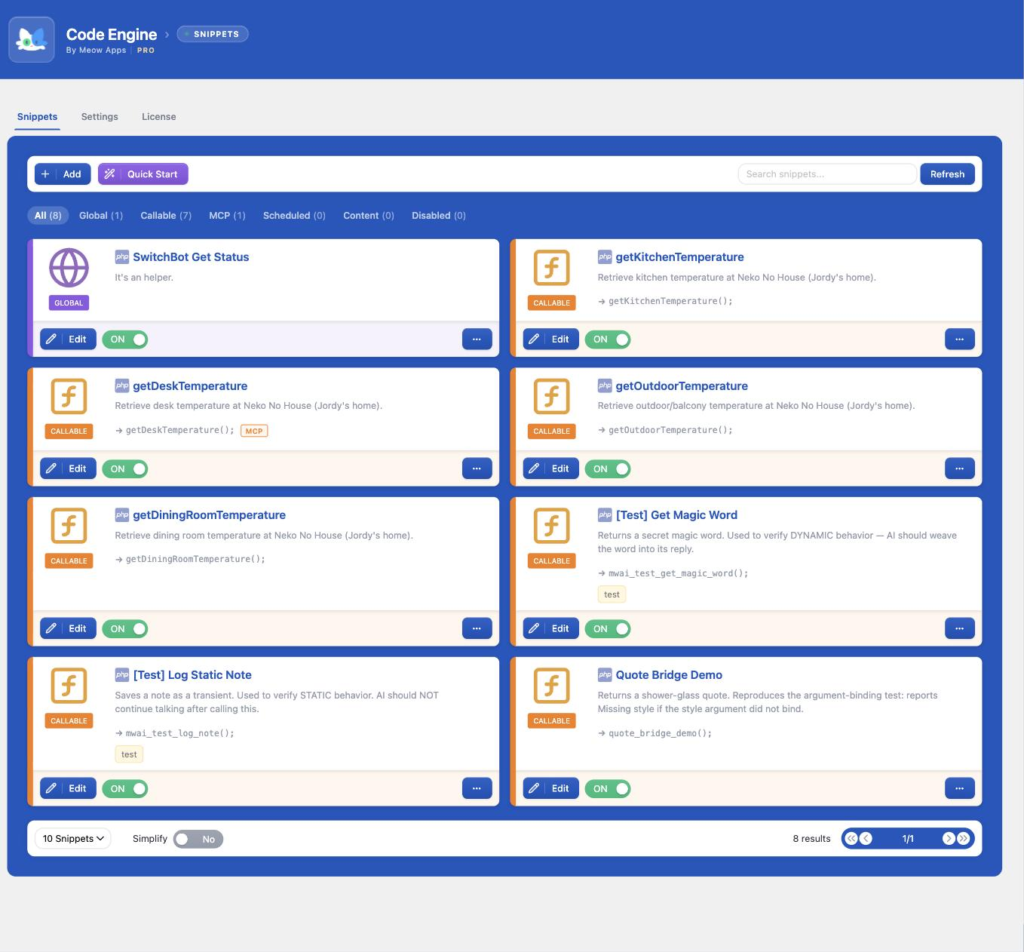
Safe by Design
Safe Mode and real-time validation protect your site from broken code.
AI-Powered
Generate, debug, and optimize snippets with AI Engine integration.
Automate Everything
Hooks, REST API endpoints, and scheduled tasks — all built in.
Developer-Friendly
Modern CodeMirror editor with highlighting, completion, and shortcuts.
Endless Possibilities
Extend WordPress with custom PHP, JavaScript, and API integrations.
REST Endpoints
Every snippet can become an endpoint for n8n, Make, or your own scripts.
How Code Engine works
A snippets plugin is normally a textarea and an on switch. You paste a function, choose whether it runs on the frontend or the backend, and that is the end of the story. The function sits there doing one job in one place.
Code Engine runs your PHP and JavaScript wherever you need it — frontend, admin, on a schedule, or inside your content — and then does something the others do not. The same function becomes three things at once.
It becomes a tool your AI chatbots can call, so a visitor asking a question can trigger real logic on your site rather than getting a generic answer. It becomes a step you can drop into a visual workflow, chained with other actions. And it becomes an endpoint the outside world can trigger over REST, so n8n, Make or a cron job somewhere else can run it.
Write one function, get all three, without writing a plugin, registering a REST route, or wiring up a tool definition by hand. That is the whole idea: your snippets stop being isolated fixes and start being building blocks for everything else you run.
Free Version
-
Snippet Management
Create, organize, and tag your PHP code snippets.
-
Safe Mode
Auto-disables code that triggers fatal errors.
-
Syntax Validation
Real-time PHP parsing catches errors before execution.
-
WordPress Hooks
Run snippets on any action or filter.
-
REST API Endpoints
Expose snippets as secure, token-authenticated API routes.
-
Scheduled Tasks
Automate recurring tasks with WP-Cron.
-
Modern Code Editor
Syntax highlighting, auto-completion, and Cmd+S.
-
Import & Export
Migrate snippets between WordPress sites.
Pro Version
-
Everything from the Free Version
-
AI Code Generation
Describe what you need, AI writes the code.
-
AI Suggestions
Smart recommendations as you write.
-
PHP Code Blocks
Run PHP directly in posts and pages.
-
JS Code Blocks
Embed JavaScript in your content.
-
Shortcodes
Insert any snippet with Code Engine: Please provide a snippet ID..
-
Shortcode Attributes
Pass dynamic values to embedded snippets.
Reviews from WordPress

Excellent Plugin for Developers and AI Integration
The Code Engine plugin is an incredibly useful tool for anyone looking to enhance their WordPress site. Its ability to manage PHP snippets in an intuitive way makes it easy to extend site functionality without much hassle. The integration with AI is a standout feature, especially when paired with the developer’s other plugin, The AI Engine, which I also recommend. The REST API support opens up automation possibilities that are simple to set up yet powerful in their impact. I’ve used it successfully with tools like Make.com to streamline workflows and save time. Overall, this plugin is a great choice for developers or anyone looking to blend automation, AI, and dynamic functionality into their WordPress site. A solid addition to any toolkit.

This App is very helpful to my creative post.
My posts are never flawless, which is why I employ this application to save time. I am employed at three jobs and enjoy blogging at the same time, and I am committed to ensuring that my website is as resourceful and accommodating as possible.